The used electronics market has exploded to $64 billion in the US alone, but so have the risks. Consumer fraud losses hit $12.5 billion in 2024—a 25% jump from the previous year—with online marketplace scams accounting for a significant share.
Whether you're selling an old iPhone, a gaming console your kids outgrew, or a laptop you've upgraded from, this guide will help you avoid scams, protect your personal data, choose the right platform, and get the best price.
The Scam Landscape for Electronics Sellers
Facebook Marketplace now hosts an estimated 34% potentially fraudulent listings, and AI-powered scams increased 456% between May 2024 and April 2025. Scammers can generate convincing fake payment confirmations, professional-looking phishing sites, and even deepfake video testimonials in minutes.
Common Scams Targeting Electronics Sellers
Fake payment notifications: Scammers send convincing screenshots or emails showing "pending" payments that don't exist, pressuring you to ship before funds actually arrive.
Overpayment schemes: A buyer "accidentally" sends $500 for your $300 laptop, then asks you to refund the difference—before their original payment bounces.
Chargeback fraud: Legitimate-seeming buyers receive your item, then dispute the charge with their credit card company, leaving you without both the item and money.
Shipping address manipulation: Buyers provide undeliverable addresses, ask you to reship to a "corrected" location, then claim non-delivery against your original tracking.
Verification code theft: Someone posing as a buyer asks you to share a Google or phone verification code to "verify your listing"—they're actually hijacking your account.
The universal protection rule: Never ship until funds appear in your actual bank account or payment app—not based on screenshots, emails, or promises.
Payment Methods: What Actually Protects You
The payment method you accept determines whether you have any recourse if something goes wrong.
Safe Payment Methods
Cash for local sales remains king—it's immediate, irreversible, and free from chargebacks. Bring a counterfeit detection pen (about $2) and inspect bills carefully.
PayPal Goods & Services offers seller protection against unauthorized transactions and "item not received" claims. It charges 3.49% plus $0.49 per transaction but won't cover "not as described" disputes.
Platform-integrated payments through eBay, Facebook Checkout, and OfferUp's shipping option provide varying protection levels with built-in paper trails. eBay's managed payments offers the most comprehensive seller protection.
Payment Methods to Avoid
| Method | Why It's Dangerous |
|---|---|
| Zelle | Explicitly offers "no purchase protection whatsoever"—instant and irreversible |
| Venmo (personal) | Zero buyer or seller protection for non-business transactions |
| Wire transfers | Cannot be reversed, favorite of scammers |
| Gift cards | Untraceable once used |
| Cryptocurrency | Irreversible, no recourse |
| PayPal Friends & Family | No protection—same as handing over cash |
| Cashier's checks | Can appear to clear before bouncing days later |
Meeting Buyers Safely
For local sales, police departments across the country now offer designated safe exchange zones—video-monitored parking areas specifically for marketplace transactions.
Search "police safe exchange zone" plus your city name, use SafeTradeSpots.com, or check OfferUp's built-in "Community MeetUp Spots" feature. These locations offer 24/7 surveillance, good lighting, and proximity to law enforcement.
In-Person Safety Rules
- Never meet alone—bring a friend or family member
- Conduct transactions during daylight hours
- Meet in high-traffic public areas (bank lobbies, busy coffee shops)
- Keep your phone charged and tell someone where you're going
- Complete the entire transaction before parting ways
- Never allow a buyer to "test" your device unsupervised
Online Safety
- Keep all communication within the platform's messaging system
- Never share your phone number, email, or home address in listings
- Remove photo metadata that might reveal your location
- Create a free Google Voice number if you must share a contact number
Wiping Your Data: This Is Non-Negotiable
A 2024 study found that 50% of used smartphones purchased from pawn shops still contained personal data despite claimed factory resets—including photos, emails, text messages, financial information, and login credentials.
Wiping an iPhone
Before resetting:
- Back up anything you want to keep
- Transfer authenticator apps to your new device
- Unpair your Apple Watch if you have one
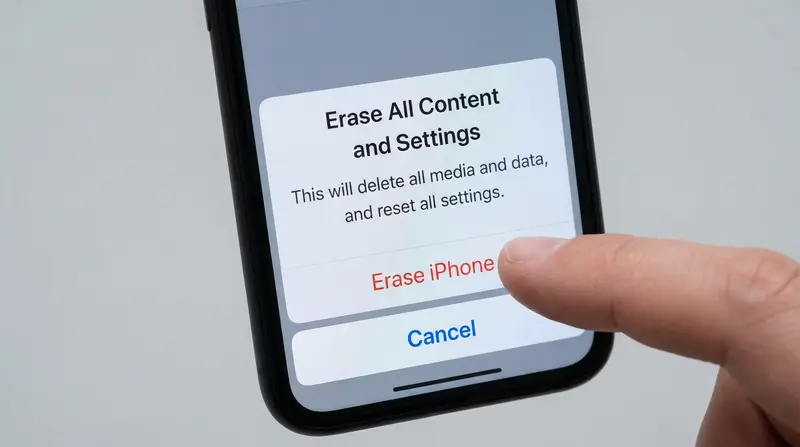
Sign out of Apple ID: Go to Settings > [Your Name] > Sign Out. This removes iCloud, App Store, iMessage, FaceTime, and crucially disables Find My iPhone and Activation Lock.
Erase the device: Navigate to Settings > General > Transfer or Reset iPhone > Erase All Content and Settings. Enter your passcode and Apple ID password when prompted. If using eSIM, select "Delete eSIMs and erase data."
The good news: iOS devices use AES-256 encryption by default. When you factory reset, the encryption keys are destroyed, making your data cryptographically unrecoverable.
Wiping Android Devices
Remove your Google account first: Go to Settings > Passwords & accounts > [Select Google account] > Remove account. This disables Factory Reset Protection, which would otherwise lock out your buyer. Samsung users should also remove their Samsung account.
Factory reset: Navigate to Settings > System > Reset options > Erase all data (factory reset). Samsung devices: Settings > General Management > Reset > Factory data reset.
For extra security on older Android devices: After resetting, fill the storage with large dummy files (videos work well), then factory reset again—this overwrites any data remnants.
Always remove your SIM card and any SD cards physically—these aren't wiped during factory reset.
Wiping Laptops
Windows PCs:
A basic reset doesn't make data unrecoverable. Go to Settings > System > Recovery > Reset PC > Remove everything, enable the "Clean data" option. After completion, use the free tool Secure Eraser to wipe free space, or run cipher /w:C: in Command Prompt.
Modern Macs (2018+): Use System Settings > General > Transfer or Reset > Erase All Content and Settings, which handles account signouts, Find My, and data erasure automatically.
Older Intel Macs: Manually sign out of iTunes, iCloud, and iMessage, then erase via Disk Utility in Recovery Mode (Command + R at startup).
Wiping Gaming Consoles
PlayStation 4/5: Deactivate as Primary Console first (Settings > Account Management > Activate as Primary > Deactivate), then run Settings > Initialization > Initialize PS4 and select "Full" for secure wiping.
Xbox: Choose Settings > System > Console info > Reset console > Reset and remove everything.
Nintendo Switch: Navigate to System Settings > System > Formatting Options > Initialize Console while connected to the internet to properly unlink accounts.
Choosing Where to Sell
The platform you choose can mean the difference between pocketing 72% of your device's value or just 42%.
Peer-to-Peer Marketplaces
Swappa stands out for electronics with the industry's lowest fees—just 3% seller fee plus PayPal processing (roughly 9.5% total versus eBay's 13%+). Every listing undergoes human review with IMEI/serial number verification against global blocklists. US-only with 4.8/5 Trustpilot rating.
eBay offers the largest buyer pool (132 million active users) and most comprehensive seller protection. Fees run 12.55% plus $0.30 per order for electronics. Best for rare or collectible items where auction format can drive prices up.
Facebook Marketplace doubled fees to 10% for shipped items in April 2024, but local pickup remains free. Protection exists only for shipped transactions using Facebook Checkout.
Mercari charges 10% seller fee (reinstated January 2025) plus buyer protection and processing fees (totaling roughly 17%).
Trade-In Programs
| Program | Pros | Cons |
|---|---|---|
| Apple Trade-In | Convenient if upgrading Apple | 20% lower than peer-to-peer; credit only |
| Carrier trade-ins | Highest advertised values ($1,100+) | Requires plan commitment; credits over 24-36 months |
| GameStop | Solid console values; Pro membership adds 10% | Lower than private sale |
| Best Buy | Accepts items others reject | Lowest values (42-49% of market) |
Buyback Services
Important: Decluttr shut down in June 2025. Gazelle continues operating with competitive phone values. BuyBackWorld accepts phones, laptops, drones, and cameras.
Buyback services typically pay 15-40% less than peer-to-peer sales, but you get a guaranteed price without managing listings or buyer negotiations.
Pro Tip: Selling electronics requires detailed, accurate descriptions to avoid returns and disputes. SellyGenie can analyze your device photos and generate professional listings that include all the specs buyers need to make confident purchases.
Pricing Your Electronics
Research Actual Sale Prices
The most important tool is eBay's "Sold Items" filter. Search for your exact device, then check "Sold Items" to see actual completed sale prices—not optimistic asking prices. Swappa's "Recent Sales" tab provides similar transparency.
Factors That Affect Value
| Factor | Impact on Price |
|---|---|
| Condition (Mint vs. Good) | +40-60% |
| Battery health above 80% | +10-15% |
| Unlocked vs. carrier-locked | +40-60% |
| Original box and accessories | +$20-50+ |
Timing Matters
iPhone values drop 9-15% immediately when Apple announces a new model and another 10-20% at release. September is the worst time to sell iPhones; late July to mid-August is optimal.
Similar patterns apply to:
- Samsung: Watch for January/February Unpacked events
- Google Pixel: Fall announcements
- Seasonal peaks: Holiday shopping and tax refund season (January-March)
Build in a 10-15% negotiation buffer and factor in platform fees (0-17%) and shipping costs ($8-15 for phones, $15-25 for laptops).
Creating Listings That Sell
Titles
Front-load searchable details: brand, model name, storage capacity, color, and carrier status.
Good: "Apple iPhone 13 Pro Max 256GB Sierra Blue Unlocked - Excellent Condition"
Descriptions
Disclose all flaws—every scratch, dent, battery health percentage, and functionality quirk. Honesty prevents returns, protects you in disputes, and builds trust.
Use a consistent grading scale:
- Mint: Genuinely like-new
- Excellent: Minimal signs of use visible only under bright light
- Good: Light scratches and minor scuffs
- Fair: Obvious wear
Photography
- Shoot near a window with indirect natural light
- Use a white poster board for a clean background
- Take 8-10 photos minimum: front, back, both sides, top/bottom edges, damage close-ups, battery health screen, accessories, serial number (blur last few digits)
- Clean your device with a microfiber cloth first
Shipping Electronics Safely
Electronics demand special packaging:
- Anti-static bags for phones and laptops
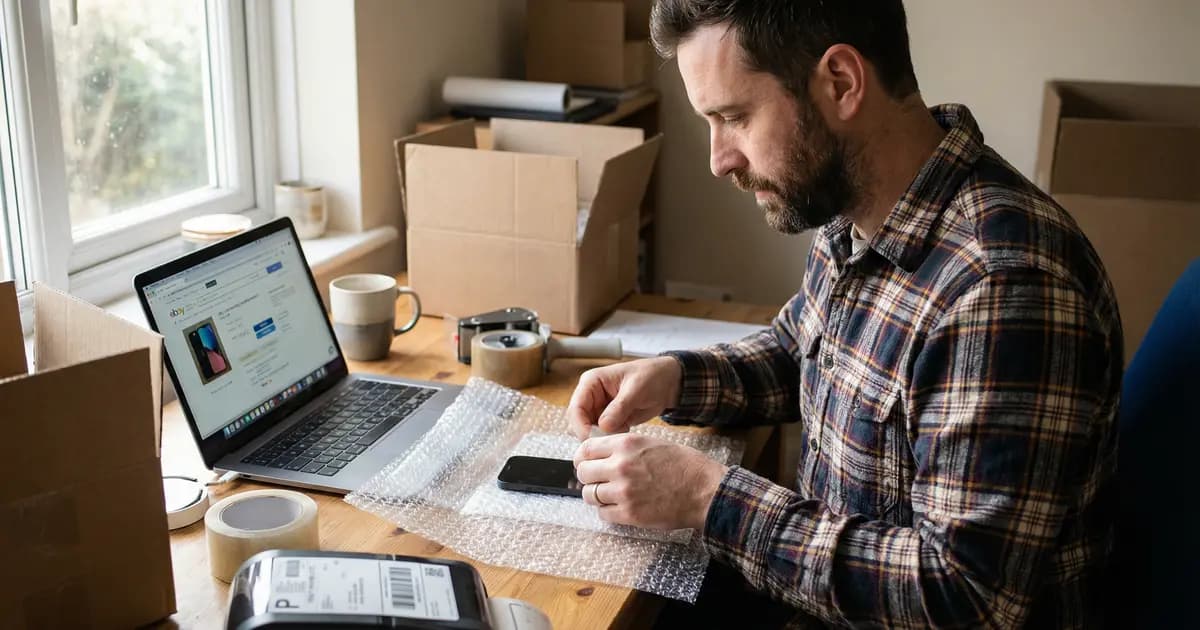
- 2-3 inches of bubble wrap on all sides
- Double-boxing for fragile items: Wrap item, place in snug inner box, center that in outer box with 2 inches of cushioning all around
The device should not move when you shake the package.
Carrier Recommendations
| Carrier | Best For | Notes |
|---|---|---|
| USPS | Lighter items | Cheapest; lithium batteries restricted to Ground |
| UPS | Valuable electronics | Best handling reputation |
| FedEx | Speed | Higher cost |
Always use tracking—non-negotiable for seller protection claims. For items over $100, add signature confirmation (eBay requires it for items $750+). Insure packages for their sale value.
Before sealing: Photograph the item and packaging process with serial numbers visible. This proves condition and prevents scam returns where buyers swap your device.
Tax Implications
Most casual sellers selling personal electronics at a loss owe nothing to the IRS. When you sell your $1,000 iPhone for $400, there's no taxable income because you lost money on the transaction.
The 1099-K reporting threshold has been restored to $20,000 AND 200+ transactions for 2025 and beyond. If you receive a 1099-K for personal item sales at a loss, you can zero out the income on Schedule 1.
Only sales at a profit create tax obligations. Keep records (original receipts, sale prices, fees) for at least three years.
Current Market Values (2025)
| Device | Approximate Value (Good Condition) |
|---|---|
| iPhone 15 Pro Max | $600-$750 |
| iPhone 14 Pro Max | $400-$500 |
| iPhone 13 | $230-$300 |
| MacBook Pro (M2/M3) | $1,500-$4,000+ |
| PS5 Disc Edition | $400-$450 |
| Xbox Series X | $350-$400 |
| Nintendo Switch OLED | $250-$300 |
iPhones retain 45-60% of value after two years—significantly better than Samsung (35% after 18 months) or Google Pixel (20% after 24 months).
Frequently Asked Questions
Is a factory reset enough to protect my data?
For modern iPhones (any model with encryption, which is all of them), a factory reset combined with signing out of your Apple ID is sufficient—the encryption keys are destroyed, making data unrecoverable. For Android and Windows devices, a basic reset may not be enough. Follow the additional steps in this guide: remove accounts first, use the "clean data" option, and consider overwriting free space afterward.
What's the best place to sell used electronics?
For smartphones specifically, Swappa offers the lowest fees (about 9.5% total) with human-reviewed listings and IMEI verification. eBay has the largest buyer base and best seller protection but higher fees (about 13%). For quick sales with less effort, trade-in programs like Apple Trade-In or GameStop pay less but eliminate listing and shipping hassles. Facebook Marketplace works well for local cash sales to avoid fees entirely.
How do I avoid getting scammed when selling electronics?
Never ship until funds appear in your actual bank account—not based on screenshots or emails. Avoid Zelle, Venmo personal transactions, wire transfers, and gift cards. For local sales, meet at police safe exchange zones during daylight with another person present. Keep all communication on the selling platform. Never share verification codes with anyone. Use tracking and signature confirmation for shipped items.
When is the best time to sell my iPhone?
Sell before Apple announces the new model, typically in early September. iPhone values drop 9-15% immediately after announcement and another 10-20% at release. The optimal selling window is late July to mid-August. If you've missed that window, consider waiting until January-March when tax refunds boost buyer demand.
Do I have to pay taxes on selling my old phone?
If you're selling a personal device for less than you paid for it (which describes nearly everyone given how fast electronics depreciate), you owe nothing. There's no taxable income when you sell at a loss. The 1099-K threshold is $20,000 AND 200+ transactions. Even if you receive a 1099-K, you can report the offsetting cost basis to show no profit. Only sales at a profit create tax obligations.
Pre-Sale Checklist
Before listing any device:
- Data protection: Back up, transfer authenticators, sign out of all accounts, disable Find My/tracking, remove SIM and SD cards, factory reset
- Pricing research: Check eBay sold listings and Swappa for your exact model and condition
- Listing creation: Write detailed title with specs, describe condition honestly, photograph thoroughly
- Sale execution: Accept only secure payment, verify funds before shipping, photograph packaging, use proper materials, ship with tracking and insurance
Thirty minutes of careful preparation prevents hours of disputes and protects both your money and your digital identity.
Ready to List Your Electronics?
Creating detailed, accurate listings is essential for electronics sales—buyers need specs, condition details, and clear photos to make confident purchases. SellyGenie can analyze your device photos and generate professional descriptions that include everything buyers need.