High-quality product photos can boost conversion rates by up to 94%, yet most online sellers underestimate how dramatically image quality affects their bottom line. The good news: you don't need expensive camera equipment. With just a smartphone and the right techniques, you can create professional-looking photos that drive sales.
Why Product Photos Matter So Much
The data is clear: 67% of online shoppers rate image quality as the most vital factor in purchase decisions—ranking higher than product descriptions (54%) or even customer reviews (53%).
The conversion impact is substantial:
- Professional-quality photos generate 33% higher conversion rates
- Listings with multiple images can see conversion increases of up to 250%
- eBay data shows adding a second image doubles conversion rates
Perhaps most critically, 22% of all online returns occur because products look different from their photos. Poor photography doesn't just cost sales—it creates expensive return cycles.
Camera Settings for Consistent, Sharp Images
Modern smartphones capture excellent product photos when configured properly. The key is achieving consistency through deliberate settings.
Lock Focus and Exposure
This is the single most important technique for consistent results.
iPhone: Tap your product to set focus, then press and hold until "AE/AF Lock" appears. Slide your finger up or down on the sun icon to adjust exposure before locking.
Android: Tap to focus and look for an exposure slider or lock icon. Many phones support long-press to lock settings.
Without locking, your camera auto-adjusts between shots, creating inconsistent exposures across your listings.
Resolution and Aspect Ratio
- Shoot at maximum resolution (12MP minimum, 24MP+ preferred)
- 4:3 works for most product photos
- 1:1 (square) maximizes cross-platform compatibility
- 16:9 works best for lifestyle hero shots
Other Key Settings
| Setting | Recommendation |
|---|---|
| HDR | Auto for general use; OFF for studio shots |
| Portrait Mode | Lifestyle shots only; standard mode for catalog photos |
| Grid Lines | ON for rule-of-thirds and level horizons |
| Timer | 3-5 seconds with stable surface to eliminate shake |
Natural Lighting That Costs Nothing
Natural light produces beautiful results when used correctly—and it's completely free.
Window Light Positioning
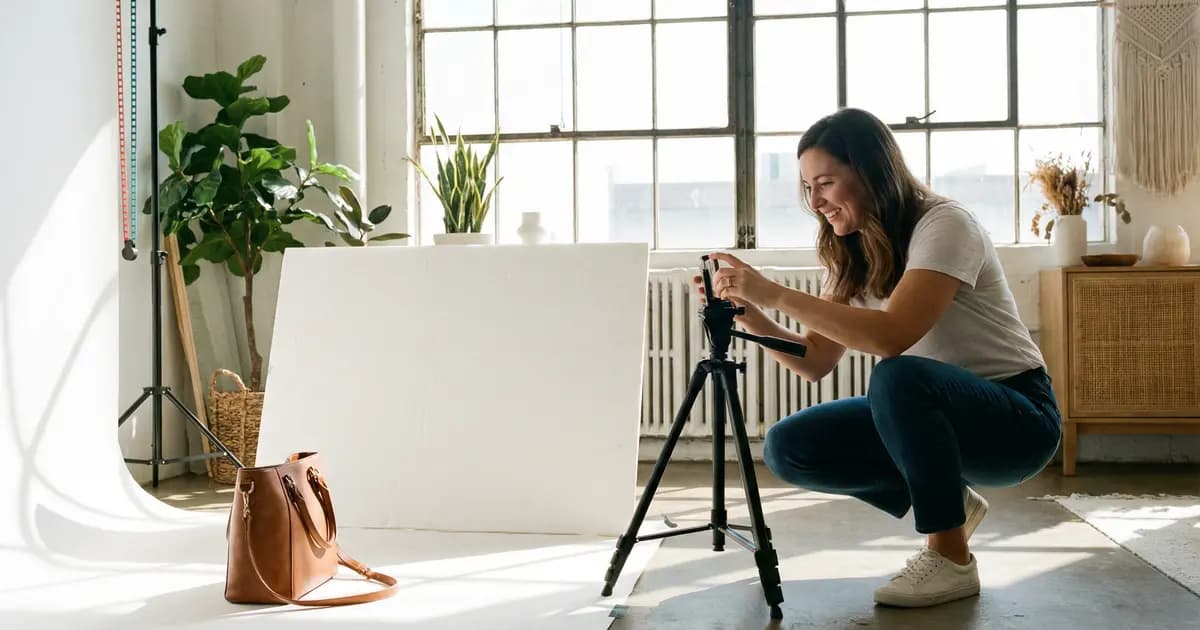
Side lighting at a 90-degree angle (window directly to your left or right) works best for product photography. It creates depth with soft shadows that add dimension.
- 1-2 feet from window: Higher contrast
- 3-4 feet from window: Softer, more diffused light
Which Direction Window?
| Window | Light Quality |
|---|---|
| North-facing | Best: consistent indirect light all day |
| South-facing | Harsh direct sun; requires diffusion |
| East/West | Problematic: constantly changing |
Overcast days are actually ideal—clouds act as a giant natural diffuser.
DIY Diffusion
Transform harsh sunlight using household materials:
- Sheer white curtains over windows
- White bedsheets
- Translucent shower curtains
- Parchment paper
The $10 Game-Changer: Foam Board Reflectors
White foam board ($8-10 at craft stores) is the single most cost-effective lighting accessory. Position it opposite your window light to bounce illumination back onto shadow areas.
- Place 6-12 inches from your product
- Angle it to face the window directly
- Closer = stronger fill; further = subtle shadow softening
Budget Artificial Lighting
When natural light isn't available, affordable options deliver reliable results.
LED Panel Two-Packs (Under $50)
Products like the Neewer USB LED Panel 2-Pack (~$30-40) include adjustable brightness and mini tripods. Position one light on each side at 45-degree angles for even illumination.
Ring Lights ($25-50)
Ring lights work but need modification—drape white cloth over them to soften the output. They're designed for portraits and produce harsh light without diffusion.
DIY Lightbox (Under $20)
For small products:
- Use a large cardboard box
- Cut rectangular windows on three sides (leave 1-2" borders)
- Cover windows with white tissue paper for diffusion
- Insert curved white posterboard as seamless backdrop
- Position desk lamps with daylight bulbs (5500K) outside each panel
Critical spec: Look for lights with CRI 95+ (Color Rendering Index) for accurate colors. Cheap lights distort colors and lead to returns.
DIY Backgrounds That Look Professional
White Posterboard Sweep
The simplest professional solution: curved white foam core board creates a seamless "infinity" backdrop. Tape it high on a wall and let it curve naturally onto your table.
- Cost: $1-5 at dollar stores
- Avoid sharp bends (creates visible lines)
- Foam core reflects light back onto products
Textured Surfaces for Lifestyle Shots
- Marble/wood contact paper on foam board (~$7 total)
- Ceramic tiles from home improvement stores ($3-5 each)
- Choose matte finishes to avoid glare
White vs. Lifestyle Backgrounds
Amazon requires pure white backgrounds (RGB 255,255,255) for main images.
Etsy prefers lifestyle photography that helps products stand out.
Best practice: White backgrounds for main images, 2-3 lifestyle images showing products in context.
Pro Tip: Great photos deserve great descriptions. SellyGenie can analyze your product photos and generate professional listings that highlight the details buyers need to see.
Free Editing Apps
Snapseed (Free, iOS and Android)
The most comprehensive free editing toolkit. The Selective tool lets you tap specific areas to edit—functionality Lightroom reserves for paid users.
Basic workflow:
- Tune Image: Adjust brightness (+10-20), contrast (+15-25), shadows
- Details tool for subtle sharpening
- Correct white balance if colors look off
- Export at maximum quality
Adobe Lightroom Mobile (Free Version)
Excels at color accuracy and white balance correction. The free tier includes exposure, contrast, highlights, shadows, and HSL color controls.
Photoroom (Free Version)
One-tap AI background removal. Includes templates formatted for Amazon, Etsy, and eBay specifications.
The Five-Step Edit
For any app:
- Adjust brightness/exposure (+10-30 if underexposed)
- Boost contrast (+10-25)
- Correct white balance for accurate colors
- Crop and straighten
- Apply subtle sharpening
Warning: Resist over-editing. 22% of returns stem from products not matching their photos—often due to oversaturated colors.
Styling by Product Category
Clothing and Apparel
- Ghost mannequin technique for main images showing fit
- Flat lay photography for supporting shots
- Amazon prohibits visible mannequins—only ghost mannequin or flat lay allowed
Jewelry
- T-bar stands and bust forms for necklaces
- Prop wax or white putty to make rings stand upright
- White cotton gloves prevent fingerprints
- Natural elements (stones, wood) add artisan appeal
Home Goods
- 45-degree or straight-on angles to show shape
- Lifestyle shots demonstrating room placement
- Multiple views including back angles for labels
Electronics
- Straight-on front for screens
- Profile views for ports and buttons
- Perspective angles to demonstrate portability
Composition Fundamentals
Rule of Thirds
For lifestyle shots, position your product at intersection points rather than dead center. For pure product shots on white backgrounds, centered composition often works better.
Best Angles by Product
| Product Type | Best Angles |
|---|---|
| Clothing | 45-degree, low angle for shoes, flat lay |
| Jewelry | Macro close-up, 45-degree, top-down for collections |
| Electronics | Straight-on front, profile views, perspective |
| Home goods | Front and profile, in-context lifestyle, back for labels |
Negative Space
Empty area around your subject focuses attention and creates professional compositions. Guideline: 2/3 negative space, 1/3 product.
How Many Images You Need
More images drive higher conversions. Research shows conversion rates increase with each additional image.
| Platform | Max Images | Recommended |
|---|---|---|
| Amazon | 9 (7 display) | 6+ (32% higher conversion with 7+) |
| Etsy | 10 | All 10 (5+ diverse photos minimum) |
| eBay | 12 | 6-8 covering all angles |
60% of shoppers need 3-4 images before purchasing. 13% require 5 or more.
Essential Shot List
- Hero shot (white background)
- Multiple angles (front, side, back)
- Detail close-ups (texture, features, quality)
- Lifestyle/in-use context
- Scale reference showing size
Platform Image Specifications
Amazon
- Main images: Pure white background (RGB 255,255,255)
- Product fills 85%+ of frame
- Minimum: 1,000 x 1,000 pixels
- Recommended: 1,600-2,000+ pixels (enables zoom)
- Secondary images: Lifestyle shots allowed
Etsy
- Recommended: 2,000+ pixels on shortest side
- Optimal: 3,000 x 2,250 pixels
- Lifestyle photos welcome and often perform better
- First images should be landscape or square
- Max file size: 1 MB
eBay
- Minimum: 500 x 500 pixels
- Recommended: 1,600 x 1,600 pixels
- White or light gray backgrounds acceptable
- No watermarks on primary photos
- Up to 12 free images
Poshmark, Depop, Mercari
- Display in square (1:1) format
- Shoot square or crop before uploading
- Depop: Original photography only (no stock photos), 4 photos + 1 video max
Common Mistakes to Avoid
Blurry Images
Cause: Camera shake, incorrect focus, low resolution
Fix: Use tripod, enable timer, upload 1,000+ pixels minimum
Poor Lighting
Cause: Underexposure, harsh shadows, mixed color temperatures
Fix: Diffused lighting, consistent sources, turn off room lights
Cluttered Backgrounds
Cause: Distracting elements
Fix: Pure white backgrounds for main images
Unrealistic Colors
Cause: Over-editing
Fix: Never alter product color. Use sRGB color profile. Test on multiple devices.
Inconsistent Style
Cause: Different backgrounds, lighting, angles between products
Fix: Create a simple style guide. Same setup for every product.
Mobile Optimization Failures
55-60% of e-commerce happens on mobile. Test all images on phones, use square formats, optimize file sizes (100-300 KB).
Frequently Asked Questions
What's the best phone for product photography?
Any modern smartphone from the last 3-4 years (iPhone 11+ or equivalent Android) produces sufficient quality for product photography. Camera technique matters far more than phone model. Focus on proper lighting, stable shooting with a timer, and locking focus/exposure. The best phone is the one you already have—invest in lighting and backgrounds instead of upgrading your phone.
Do I need to buy lighting equipment?
Not necessarily. Natural window light produces excellent results and costs nothing. Position your setup near a large window with the light coming from the side. A white foam board ($8-10) to reflect light into shadows is the only "equipment" most beginners need. Only invest in artificial lighting if you can't access consistent natural light or need to shoot at night.
What background should I use for product photos?
White backgrounds work universally and are required by Amazon for main product images. Use white foam core or posterboard curved to create a seamless sweep. For platforms like Etsy where lifestyle photos perform well, add 2-3 contextual images showing the product in use. The key is consistency—use the same background style across your entire catalog.
How many photos should I include per listing?
Minimum 5 images per listing, more if the platform allows. Research shows conversion rates increase with each additional image. Cover: hero shot on white background, multiple angles (front, side, back), detail close-ups showing quality and features, lifestyle shot showing the product in use, and scale reference. 60% of shoppers need 3-4 images before purchasing.
Should I edit my product photos?
Yes, but keep edits subtle. Adjust brightness, contrast, and white balance to make photos accurate and appealing. Straighten and crop as needed. Apply light sharpening. However, never alter product colors, hide flaws, or over-edit to make products look better than reality—22% of online returns occur because products don't match their photos. Free apps like Snapseed handle all basic editing needs.
The Bottom Line
Product photography represents one of the highest-ROI investments for online sellers. With nothing more than a smartphone, natural window light, $10-20 in foam board, and free editing apps, you can create professional images that compete with established sellers.
The 78% of shoppers who want more product images are telling you exactly what they need. Meeting those expectations with consistent, high-quality smartphone photography transforms casual browsers into confident buyers.
Great Photos Deserve Great Descriptions
Once you've captured professional product photos, you need descriptions that match. SellyGenie analyzes your images and generates professional, detailed listings in seconds—so you can focus on photography while AI handles the writing.